Evidence is a record of one real learning activity. Below are two made-up record examples and a report built from them. The first is the kind of entry the Chore-to-Curriculum Builder and the practice tools export. The second is what a Wattlewood task record holds.
Example 1: an exported evidence entry
This is the kind of entry the Chore-to-Curriculum Builder and the practice tools export. It has a formal summary, a parent description, a child reflection, a curriculum line and an evidence type such as a photo. When Wattlewood imports these files (Import Evidence), photos are not copied in: each record notes how many photos it had, and you keep the file.
Example only
This child and activity are made up to show the wording. It is not a real family's record, and it is not a screenshot of the app.
Child
Mia (example name)
Date
1 October 2026
Activity
Cooking family meal
Curriculum area
Mathematics > Measurement
Evidence type
Work sample: photo of scaled recipe
Summary
Mia applied fractions and precise measurement to scale recipe quantities.
Parent's description
Doubled a pasta sauce recipe for 8 people.
Child's reflection
The sauce thickened as it cooled.
Example 2: a Wattlewood task record
A Wattlewood task record has a title (the subject, the theme's task name and the lesson name), the date, "Completed", and the wording of the level your child worked at. Its summary is your note if you typed one; if you didn't, it is the task's learning objective, and when you did type a note the objective shows beneath it as "Learning focus". It has no child reflection, photo or curriculum code. For NSW and Tasmania only, each record also has an optional box where you can type a syllabus outcome code; the app never fills it in.
Example only
This child, note and task record are made up to show which fields a task record holds. It is not a real family's record, and it is not a screenshot of the app.
Title
English: The Detective's Task: How Language Expresses Identity
Date
3 October 2026
Status
Completed
Level worked at
analyse how language choices in a text reveal a character's or speaker's identity
Summary
Mia compared how she talks to Nan with how she messages her friends. Learning focus: Understand how language choices express and create personal and social identity.
Example 3: a full report
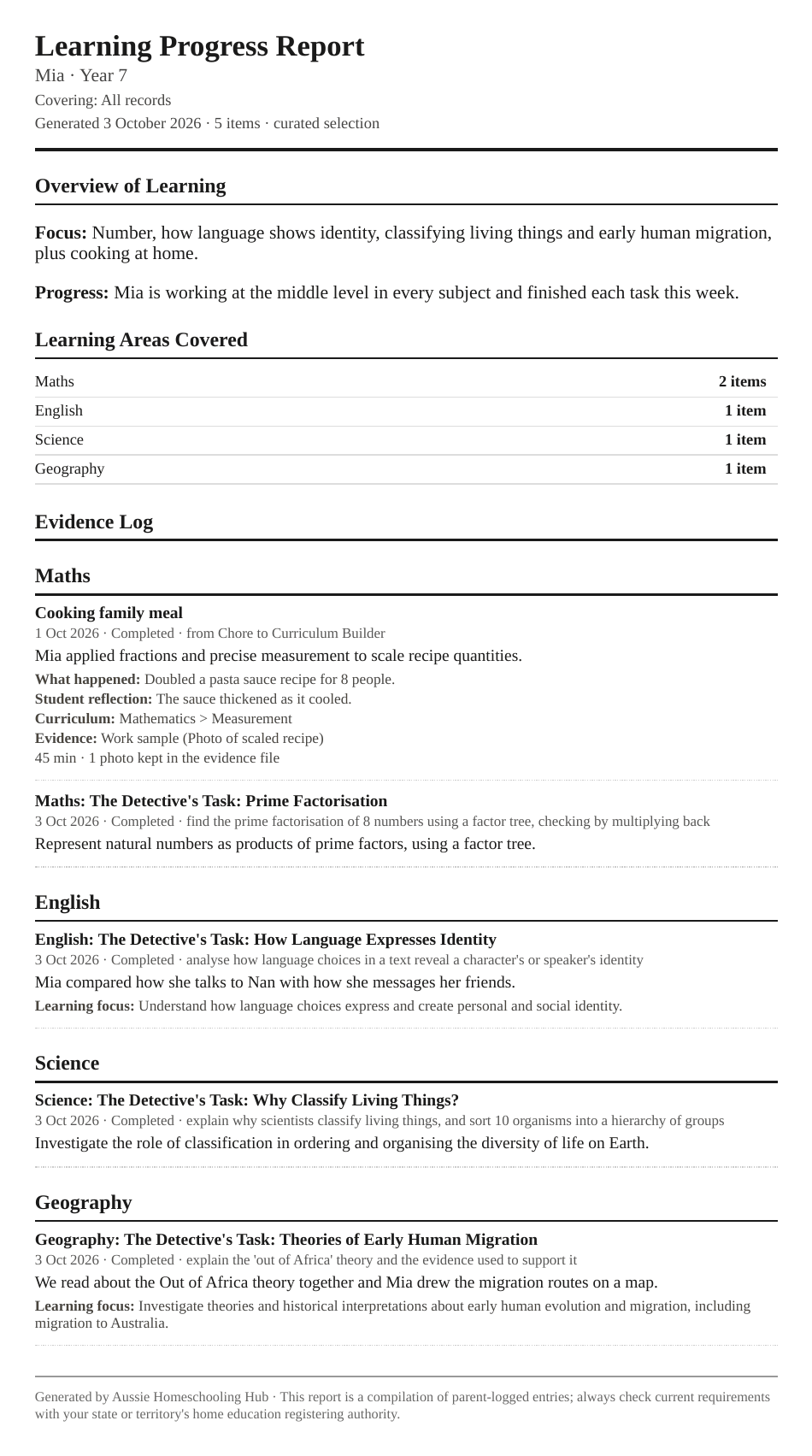
This is a Learning Progress Report made from the two kinds of record above. The text versions of the records are above and below, in case the picture is hard to read.
(opens the full-size image in a new tab)Example only: a report made from an imported Chore-to-Curriculum Builder entry and Wattlewood tasks. The child's name is a placeholder.
How to read the first example
Summary: the formal record for a registering authority. It is written in the third person and past tense, uses the child's first name, and says what the child did and what learning it showed.
Parent's description: what actually happened, in the parent's own plain words.
Child's reflection: the child's own words, exactly as they gave them. If the child didn't write anything, this stays empty.
The rules behind the wording
An entry says what the child did. It doesn't grade, praise or predict.
It uses a child's first name only. No surname, date of birth, address or school.
It names learning areas from the Australian Curriculum, and only ones the activity honestly touched.
A summary is built only from what the child and parent actually entered or did.